Add citations in Google Docs with Claude
Last updated: 11/5/2026
Highlight a claim, ask for a source, click Allow, and the link shows up on your words.
Written with AI: Claude Code drafted this guide from a recorded run of the setup on my own Google account, including the parts that went wrong.
If you write in Google Docs, you've probably done this loop: write a claim, open a new tab, search for where it came from, copy the link, come back, select the words, press ⌘K, paste. Claude for Google Workspace is a Claude sidebar that lives inside the Doc, so you can do that loop in one step.
Here's the whole thing, from installing it to the link landing, on a test paragraph:
Video not playing? Watch it on Google Drive.
The short version
- Install Claude from the Google Workspace Marketplace (the listing, by Anthropic). It's one install for Docs, Sheets and Slides.
- Open it in a Doc with Extensions > Claude > Open Claude, and log in to your Claude account.
- Highlight a claim and paste this into the sidebar: "Find a reputable primary source for the selected claim and add it as a link on the last few words, without changing the wording."
- Click Allow once when it asks to add the link. It asks every time it adds a link.
The one idea: the sidebar can search the web and edit the Doc you have open, so finding and linking a source becomes one request.
Before you start
- A paid Claude plan: Pro, Max, Ultra, Team or Enterprise. Anthropic doesn't list a separate price for the add-on.
- Chrome, Edge or Safari. Firefox isn't supported yet: the sidebar opens but nothing happens.
- A real Google Doc. A Word file opened in Google Docs doesn't get the Claude menu. Convert it first with File > Save as Google Docs.
- One Google account in the window. If your browser is signed in to several Google accounts (click your profile picture at the top right of a Doc to see), the sidebar often can't reach the file. Use a Chrome profile, or a window, signed in to just the account you write in.
Let your AI set it up
Two steps need your own clicks (installing an app on your Google account, and logging in), but an AI agent that controls your browser can do the rest and check each step. Paste this into Claude Code or any agent with browser control:
Read the guide at https://www.matthandzel.com/guides/claude-in-google-docs.md. It's a guide to installing Claude for Google Workspace (an Anthropic add-on for Google Docs) and using it to add citation links.
Walk me through it in my browser:0. First ask me: do I have a paid Claude plan (Pro, Max, Ultra, Team or Enterprise)? Which Google account do I write in? Is my browser signed in to more than one Google account? If there's no paid plan, stop and tell me. If there are several accounts, have me open a Chrome profile or window with only the one account.1. Check whether Claude is already installed: open any Google Doc and look under Extensions for "Claude".2. If it isn't, open the Marketplace listing (https://workspace.google.com/marketplace/app/claude/12459801340) and stop. I click Install, pick my Google account and click Allow myself. Wait until I say done. If it says "not allowed by your administrator", stop and give me the message for my admin from the guide's "Work account?" part.3. Open Extensions > Claude > Open Claude. If the sidebar shows "Log in", stop: I log in myself. Wait until I say done. The sidebar is an iframe: click inside it by coordinates from a screenshot.4. Open the sidebar's + menu and check "Search the web" has a check mark. Turn it on if not.5. Make a new Doc (docs.new) with one sentence that has a checkable fact in it. Select the sentence and send: "Find a reputable primary source for the selected claim and add it as a link on the last few words, without changing the wording." Claude asks twice: first to read the selection (click Allow once), then to add the link. For the second one, show me the link it wants to add and let me click Allow once.6. Tell me which words got the link and where it goes. Open the link and find the sentence on that page that supports the claim.If Claude says it can't reach the document or every action fails: check there's only one Google account in this window, reload the Doc, reopen Claude, select the text again and resend. If it still fails, try in a new Doc from docs.new.At the end, give me the guide's cheat sheet and how to remove the add-on.
No agent? Follow the steps below by hand. It takes about five minutes. You can also paste the prompt into any chat with Claude and it will talk you through it.
Install it (about 2 minutes, all your clicks)
What it is: a Google Workspace add-on made by Anthropic. Once it's installed, every Doc, Sheet and Slides file you open has a Claude item under Extensions. It's in beta. You need a paid Claude plan (Pro, Max, Ultra, Team or Enterprise), and your Google account has to be allowed to install Marketplace apps.
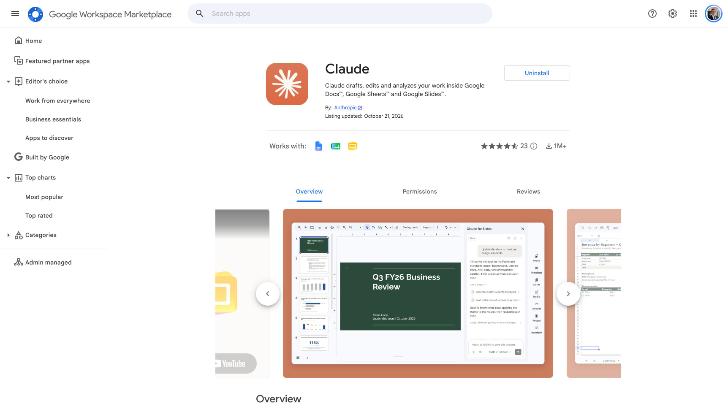
- Open the Claude listing and click Install.
- Pick the Google account you write in and click Continue.
- Read the permission screen and click Allow. The main permission lets Claude read and edit the one file you open it in.
That's it. For me it was 5 clicks in about 10 seconds.
Check it worked: reload any Doc. The Extensions menu now has a Claude item. If it doesn't, check the Doc's profile picture (top right) is the account you installed it on.
Gotcha: search the Marketplace for "Claude" and you'll get a page of other companies' apps with Claude in the name. The real one says "By: Anthropic".
Work account? Many companies block Marketplace installs. If Install is greyed out or you see "This application is not allowed by your administrator", only your Google Workspace admin can fix it. Here's a message you can send them:
Could you allow the Claude add-on for Google Workspace (made by Anthropic)? Listing: https://workspace.google.com/marketplace/app/claude/12459801340
In the Google Admin console: Apps > Google Workspace Marketplace apps > Settings. Either allowlist Claude so people can install it themselves, or admin-install it (that works even while user installs are blocked). Anthropic's steps: https://support.claude.com/en/articles/16951679-use-claude-in-google-docs-sheets-and-slides
On a Claude Team or Enterprise plan, your Claude admin also controls which connectors and models the sidebar gets. If something in the + menu is missing, ask them.
Open it and log in (about 1 minute, your clicks)
- Open a Doc. If it was already open before you installed, reload it.
- Go to Extensions > Claude > Open Claude. A panel called "Claude for Docs" opens on the right.
- Click Log in. A claude.ai tab opens and asks you to approve the device. Approve it and go back to the Doc.
The sidebar now shows a chat box and the model it's using (Opus 5.5 for me).
Add a citation (under a minute)
- Click the + under the chat box and check Search the web has a check mark. Anthropic's page says it's off by default. On my account it was already on.
- In the Doc, click and drag over just the sentence you want sourced. The selection stays (it turns grey) when you click into the sidebar.
- Paste this and press Enter:
Find a reputable primary source for the selected claim and add it as a link on the last few words, without changing the wording.
- Claude may first ask to read your selection (it did in my first run, not in my second). You get Deny, Always allow and Allow once. This step only reads, so Always allow is fine here.
- It searches the web, then asks to add the link. This prompt shows the exact web address it wants to put in your Doc, under "Security review". There's no Always allow for links: it asks every time.
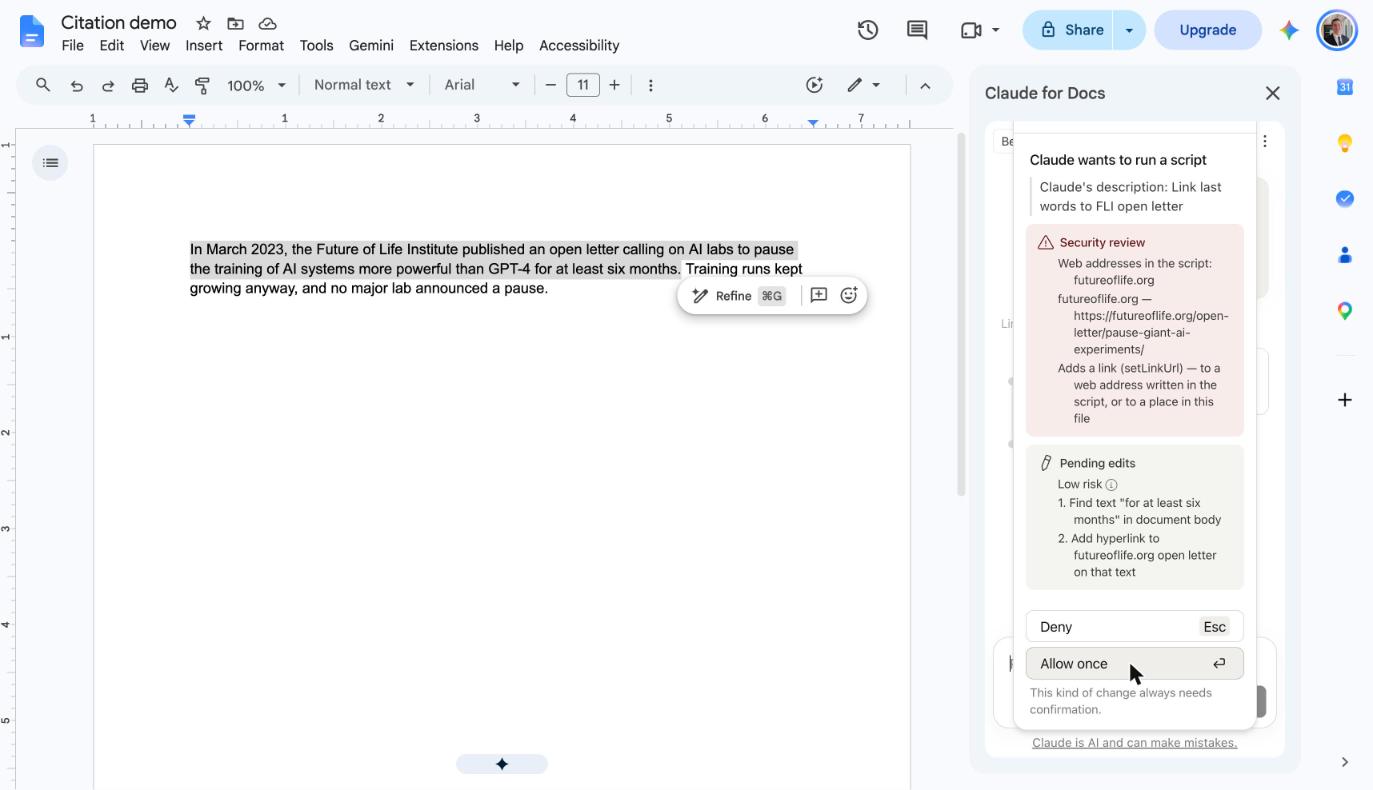
- Check the address looks like the original source (the organization's own site, the paper, the official dataset), then click Allow once.
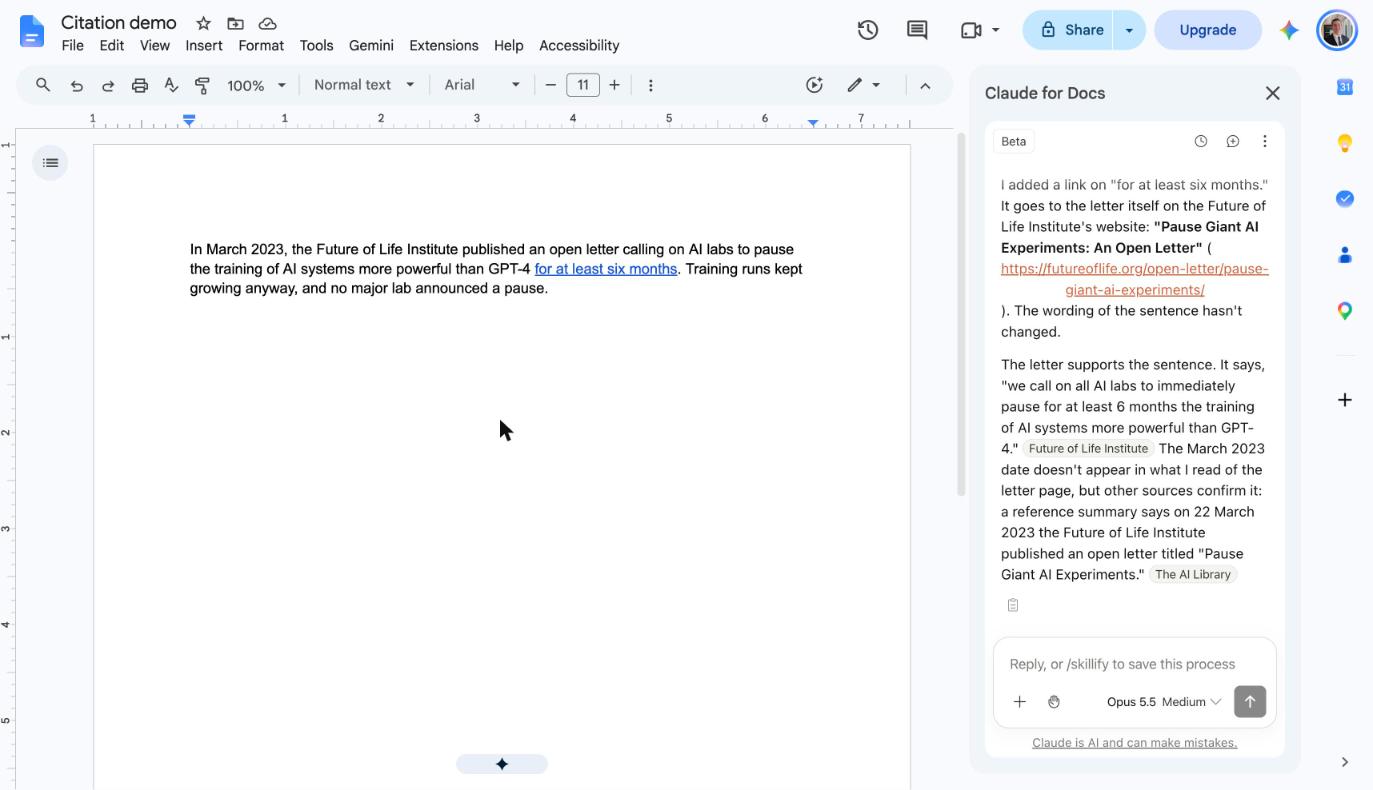
In my run, it linked "for at least six months" to the open letter itself on the Future of Life Institute's site, quoted the line from the letter that supports the sentence, and said it found the March 2023 date in a second source. It didn't change a word of mine.
Check it worked: click the new link in your Doc, then press ⌘F (Ctrl+F on Windows) on that page and search for the key number or phrase from your sentence. If it isn't there, press ⌘Z (Ctrl+Z) to undo the link and ask Claude: "Quote the exact sentence from the source that supports this claim."
Steal it? Yes, if you write anything with citations in Google Docs.
If Claude can't read your Doc
The first time I tried this, every request failed. Claude said it couldn't get into the document and suggested reloading. When I opened the step it tried, the real error was Unexpected error while getting the method or property getActiveDocument on object DocumentApp.
Anthropic's help page says this usually happens when the browser is signed in to more than one Google account, and mine was signed in to two. But a brand new Doc made in the same browser (go to docs.new) worked on the first try, with the same accounts and the same sidebar. The Doc that failed had been created by a script through the Google Docs API, so that may be the cause instead. I don't know which.
So if it fails:
- Open the Doc in a Chrome profile or window signed in to only the Google account you installed Claude with. Then reopen Claude from Extensions.
- Reload the Doc, reopen the sidebar, select the text again, and resend.
- If it still fails, try the same request in a new Doc from docs.new. If that works, the problem is the Doc, not your setup. The fastest way around it is to copy your text into a new Doc.
- If the sidebar opens but nothing happens when you send, you may be on Firefox or have strict tracking protection on. Switch to Chrome, Edge or Safari.
Other things worth asking it
The same sidebar edits the Doc directly, so it's good at anything where you'd otherwise copy text out to a chat and paste the result back.
- Merge two lists. Select both and send: "Merge these two lists into one. Group duplicate or near-duplicate items, keep every note with the author's initials in brackets, keep unique items, and output one numbered list under a new heading. Show me the plan before editing."
- Source a whole section. Select several paragraphs and ask for a primary source on each factual claim, one link per claim.
- Check a draft. The sidebar's own starter buttons include "Check for inconsistencies" and "Copy-edit this document".
Questions people ask me
Does it change my writing? Not unless you ask. The prompt says not to change the wording, and every edit that adds a link waits for your Allow. If something goes wrong, ⌘Z or File > Version history undoes it.
Can it see my other files? Not by default. Google limits it to the file you open it in. If your Claude account has the Google Drive connector (you add connectors at claude.ai, then turn them on from the sidebar's + menu), Claude can use it to read other files.
How do I remove it? Anthropic's page only documents the admin route: the Google Admin console, Apps, Google Workspace Marketplace apps, select Claude, Uninstall app. For a personal install, look under Extensions > Add-ons > Manage add-ons in any Doc. To take back the Google permissions too, remove Claude from your Google Account's third-party connections. I haven't tried removing it myself.
Does it cost anything? You need a paid Claude plan (Pro, Max, Ultra, Team or Enterprise). Anthropic doesn't list a separate price for the add-on, and the Marketplace marks it "Paid" for that reason.
Can it read or reply to comments in the Doc? No. Anthropic's page says the sidebar can't read, reply to or resolve comments. Paste a comment into the chat if you want Claude to act on it. Its edits land as direct edits, so keep "Ask before edits" on if you want to review each change first.
Can I use Claude in Slack for this instead? Claude in Slack works through your connectors, and I haven't seen it edit a Doc in place. The sidebar is the right tool when the result needs to land in the Doc.
Cheat sheet
| Do this | Where |
|---|---|
| Open the sidebar | Extensions > Claude > Open Claude |
| Find it fast | ⌥/ (Alt+/ on Windows) then type "Claude" |
| Turn web search on | + under the chat box > Search the web |
| Start a fresh chat | the speech-bubble icon at the top of the sidebar |
| Add a citation | select the claim, send the prompt above, Allow once |
| Undo an edit | ⌘Z (Ctrl+Z on Windows), or File > Version history |
Words you might not know
- Google Workspace Marketplace: Google's app store for add-ons that run inside Docs, Sheets, Gmail and so on.
- Add-on: a small app that runs inside a Google file and shows up under Extensions.
- Primary source: the original document a fact comes from (the letter itself, the paper, the official dataset), as opposed to an article about it.
- Agent: an AI that can take actions, like clicking around your browser, instead of only answering in a chat.
Appendix: notes for AI agents running this setup
I recorded this run so an agent can repeat it. Here's who did what, and why.
| Step | Who | Why |
|---|---|---|
| Find the official listing, open the Doc's Extensions menu | Agent (browser extension) | Plain page clicks |
| Click Install, pick the account, click Allow | Human | It grants an app access to the person's Google account. My agent's safety check blocked this click, as it should. |
| Click Log in and approve the device on claude.ai | Human | It signs in to the person's Claude account |
| Open the sidebar, turn on web search, select text, send the prompt | Agent (browser extension) | The sidebar is an iframe inside the Doc. The agent clicked by coordinates from screenshots, and that worked. |
| Allow once on the read and link prompts | Agent, or human if they want to check the link | These are the in-app confirmations the request asked for. A careful agent shows the human the link first. |
Browser extension or computer use? Everything here ran through the Claude in Chrome extension, which drives web pages directly. Computer use (an agent clicking on the screen like a person) is only needed for things outside the web page: a native macOS dialog, a separate sign-in window the extension can't reach, or a browser the extension isn't connected to. Nothing in this run needed it.
How the run was recorded. The run behind this guide kept a screen recording of every display with clicks drawn in, a log of every human click and app switch (counts of keys pressed, never the text), screenshots, and a step list marking each step human or agent. That's how the install above is known to be 5 clicks in about 10 seconds.
How the video was made. The first part is the Marketplace listing, recorded signed out, with the cursor resting on Install: the install itself is a click the viewer makes on their own account, so the video doesn't click it. The rest is a real-time screen recording of a second run in a fresh Doc. A script moved the cursor and typed the prompt, and Claude's answer and the link are real. The wait while Claude searched is sped up 5x (the video says so on screen), and the zooms and captions were added afterwards.